
For iPhone · iOS 17 and later
Between the reach and the feed there is a decision.
The hand is faster than the thought.
Think First interrupts the reflex with a calm countdown and one question — do you actually want this right now? Most of the time the answer is no.
Free to use. No account, no ads.
- 0accounts needed
- 70+apps in the list
- 100%stored on device
Do you really want to open Instagram?
You wanted to work on your application today.
The moment this is about
Nobody opens Instagram as a decision. The hand is faster than the thought. That is where Think First steps in — not into your willpower.
You reach
Reflex. Your thumb knows where the icon sits better than you do.
It holds
A countdown, a question, the sentence you wrote yourself earlier. Nothing flashes, nothing scolds.
You decide
Through or back. Either is fine. Only one of them gets counted for you.
No parental-control tone, no lock you have to defeat. The way out is always there — you just take it less often when taking it has to be deliberate.
What it looks like in the app
Real captures from the app — no dummies, no renderings.
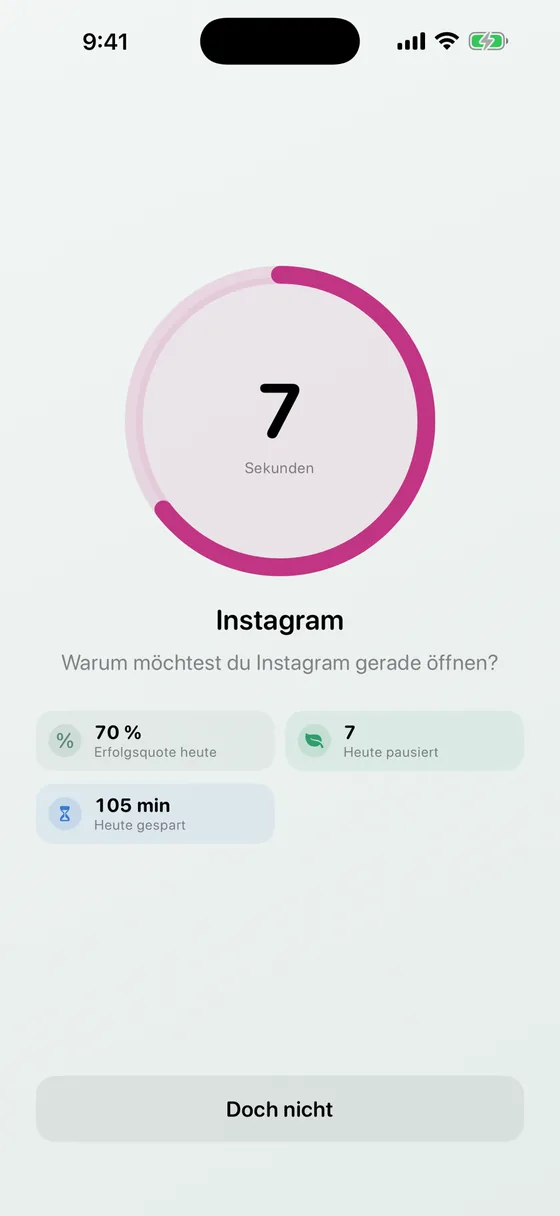
The wait screen with countdown 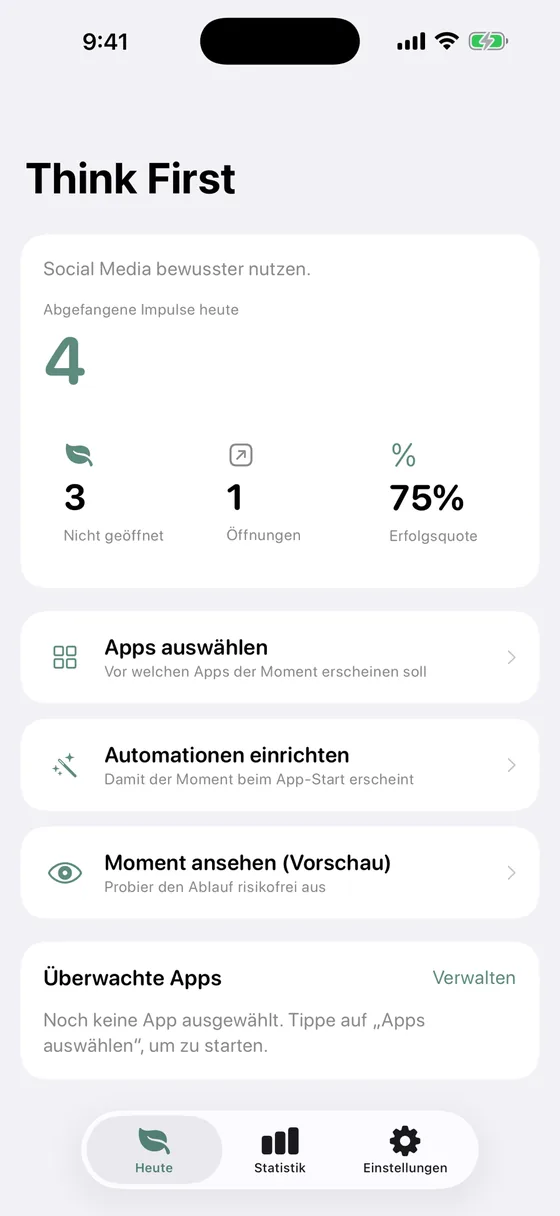
Focus tab with level ring 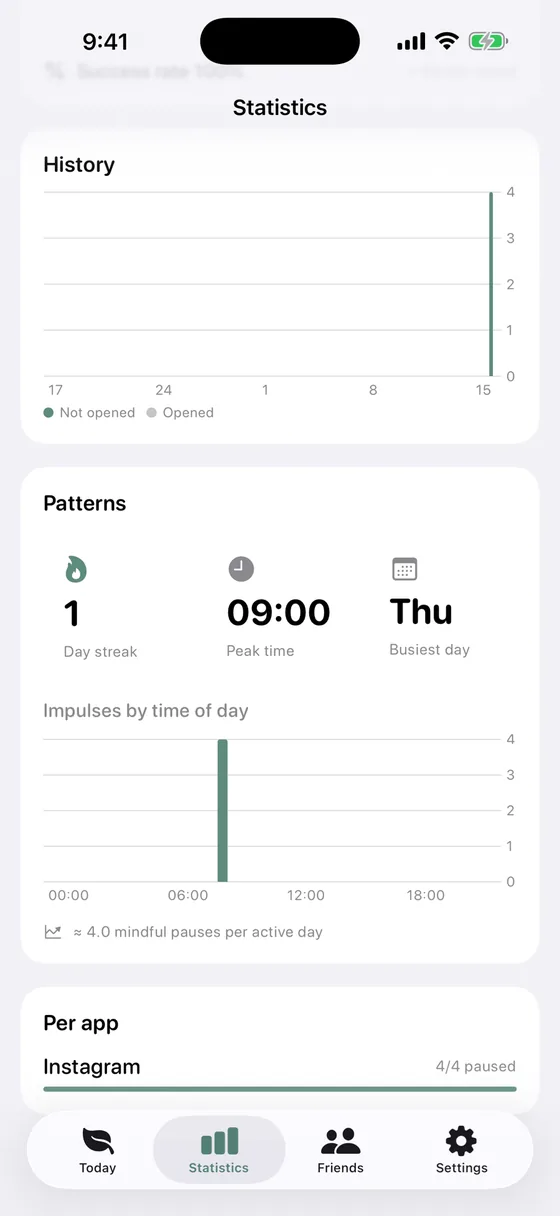
Statistics and weekly trend 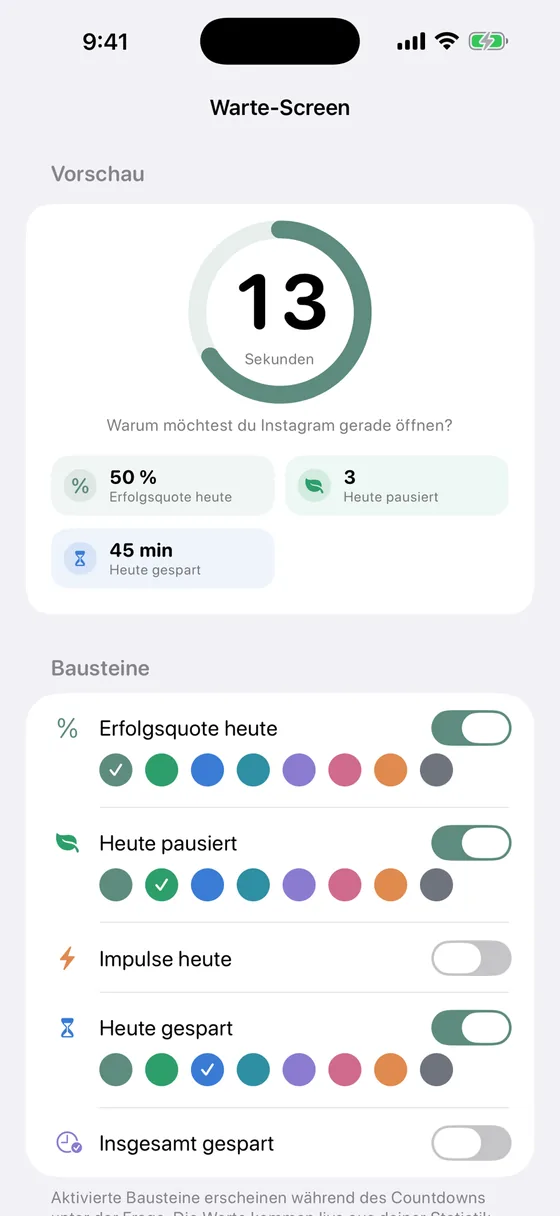
Wait-screen builder 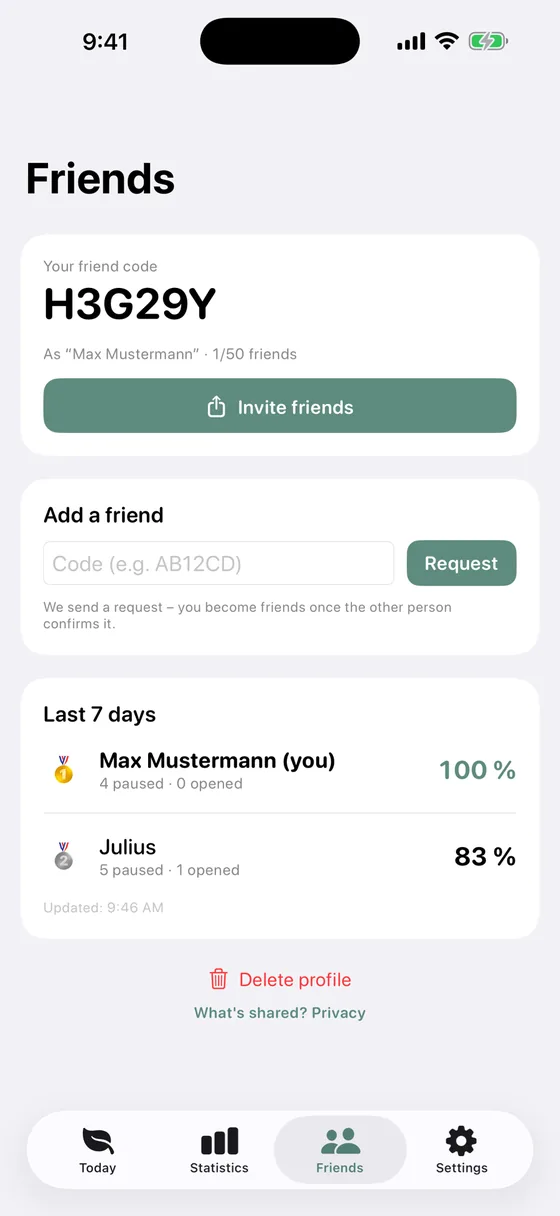
Friends and daily limits
Swipe sideways to browse
Set up in three steps
The fast path takes under a minute.
- 01
You see what the moment looks like
Before you configure anything, Think First shows you the wait screen this is all about.
- 02
You pick your app from a list
Around 70 well-known apps, by name and icon. Link it once in the system dialog — done.
- 03
You allow notifications – that's it
Screen Time and notifications: Think First needs both, so the path from the locked app to your countdown works.
Write down what you need it for
Before the app opens, you type one sentence about what you're actually there to do.
Apple Intelligence reads along right on your iPhone and checks whether you really answered — not whether your reason is good enough. The text never leaves your device.
As a shortcut
Answer properly and you're straight in. Intent replaces the wait.
Or mandatory
No sentence, no entry. Don't feel like typing? You wait longer instead.
Never a lockout
The check only costs time. It never shuts you out.
Requires iPhone 15 Pro or newer with iOS 26. Included in the free version.
Your apps, called by name
The centrepiece of version 2.0.
You pick your app from a list of around 70 well-known apps and link it once in the system dialog. From then on it shows up everywhere the way you know it: in your statistics, in notifications and on the lock screen — where it says “Instagram is locked” instead of just “Locked”. If an app is missing, you add it yourself.
- Around 70 well-known apps with name and icon
- Add your own entries for anything missing
- Selected websites get locked too — the browser was the open back door
The Shortcuts route still exists under Settings → Advanced — an option for advanced users, not the normal path.
How the moment actually runs
Explained honestly, including the detours iOS forces on us.
You tap the app, it's locked. A tap on “Start moment” sends you a notification; tap that and your countdown runs in Think First. Then you decide — and the app opens by itself. The detour through the notification isn't convenience, it's the only way: Apple forbids the lock screen from opening an app — including Think First itself.
Think First needs two permissions
Screen Time AND notifications. Without notifications the app stays locked and you have to open Think First by hand every time.
A time budget, not an open door
Deciding doesn't mean open for the rest of the day.
After the countdown Think First asks: how long do you need? Five, fifteen or thirty minutes. After that the app locks itself again — and what gets counted is real usage time, not the clock. If the phone sits on the table in between, your budget doesn't keep running.
Your reasons
What you tell yourself before you open it.
If you turn on the typed answer, Think First collects your reasons — on your iPhone only. After a few days you can see which sentence you tell yourself most often. “Just a quick look” — fourteen times this week.
Focus sessions and daily limits
For everything you'd rather not decide in the moment: windows and budgets you set once.
Focus sessions and schedules
"8am–3pm studying", weekday-aware, repeating — or simply starting right now.
- Repeating schedules per weekday
- One-tap focus session for right now
- Several schedules can run side by side
Daily limits
Pick apps, pick minutes per day. When the budget is spent, the apps lock themselves.
- Minute budget per app or group
- Resets at midnight
- Visible before it gets tight
Hard Mode
If you want, a running session or a spent limit becomes unchangeable until it ends. For the moments you don't fully trust yourself.
5 apps · Hard Mode
Progress that rewards the right moment
What gets counted is not how long your phone stays down, but how often you let an impulse pass.
Daily goal
XP and levels
Every resisted impulse earns experience. Levels rise slowly and honestly.
Streaks
Consecutive days where you hit your goal.
12 badges
For real milestones — not for opening the app.
7-day report
A calm weekly recap instead of a bar-chart indictment.
Your biggest temptation
Statistics show which app pulls you in most often, broken down per app.
This week
Impulses resisted per day
- 6Mon
- 9Tue
- 4Wed
- 11Thu
- 8Fri
- 3Sat
- 7Sun
Friends
Friendships built on mutual consent. The leaderboard runs on a score made of caught impulses, focus minutes and success rate; the numbers sync in the background.
Friends cost nothing — add, accept and compare with up to 50. Nicknames are checked for offensive content.
Show what you won back
Your numbers, your streak or a newly unlocked badge can become a ready-made portrait image for stories and chats. You see exactly what you are sending before you share it. Nothing is shared automatically.
Your data stays on your device
That's not a marketing line, it's the architecture of the app.
No account
No email, no login, no sign-up. You download the app and use it.
Local storage
Statistics, schedules, limits, progress — all of it lives on your iPhone.
No tracking, no ads
No analytics SDKs, no ad networks, no profiles.
Only friends talk to a server
And only a nickname plus a daily counter. Not which apps you use, not when, not for how long.
App selection happens inside Apple's own picker. Not even Think First learns which apps you chose.
Free to use. Premium if you want more.
Try it free for 7 days. Cancel any time.
Free
€0forever
Everything you need to start.
- Three monitored apps
- The deliberate moment with countdown
- Write down your intent (iPhone 15 Pro and newer)
- Instant focus sessions
- Statistics for today
- XP, levels, streaks and badges
- Friends and leaderboard, up to 50
Premium
- Hard Mode — the lock can't be dismissed while it's running
- Daily limits — “30 minutes of social media”, then it's shut
- Focus schedules — “Studying 8am–3pm, Mon–Fri”
- Unlimited apps
- Growing wait time
- Impulse quota
- Usage reminders
- Time profiles
- Recap as a notification
- Your own motivation lines
- Statistics export
- Custom wait time and question per app
- Daily hint per app (“15 minutes of Instagram”)
- Your reasons: what you typed before you opened it
- Streak insurance: one day off per week
- Custom countdown lengths and questions
- All 11 themes and 10 app icons
- Full statistics
- Home and lock screen widget
- Wait-screen builder
Already subscribed to Think First Premium? Your price of €2.99 a month stays unchanged.
Frequently asked
Short answers, no dodging.
Does Think First need Screen Time permission?
Yes. iOS only allows shielding other apps through Screen Time and Family Controls. That permission stays entirely with Apple: it gives Think First no list of your apps and no usage data, only the ability to protect your anonymous selection.
Can I bypass it?
Yes, by design. You can dismiss the wait screen and open the app anyway, and the SOS exit unlocks everything for 5 minutes after a long press on the app icon and three deliberate confirmations. Everything locks itself again afterwards, even if you never reopen Think First. Think First isn't a leash. It just makes sure the decision belongs to you and not to your thumb.
Does it work without the internet?
Completely. Countdowns, schedules, limits and statistics all run offline. Only the optional friends feature needs a connection.
What happens to my data?
It stays on the device. No account, no cloud profile, no tracking, no ads. If you add friends, only your nickname and a daily counter are transmitted.
Does it drain the battery?
No. Protection runs on iOS's own mechanisms, so there's no background service ticking along. The wait screen is only active for the seconds you're looking at it.
What happens if I delete the app?
Protection stops immediately, and everything stored locally — statistics, levels, schedules, limits — goes with the app. There is no backup on our servers, because there never was one. An active subscription has to be cancelled separately in your Apple ID subscription settings. If you used the friends feature, delete your profile inside the app first.
Does it work on an iPad?
Think First is built and tested for the iPhone. It installs on an iPad through iPhone compatibility mode but isn't optimised for it. Protection and statistics apply per device and are not synced between iPhone and iPad.
Why does Think First need notifications?
Apple forbids the lock screen from opening an app — including Think First itself. The notification is the only path from the locked app to your countdown. Without it the app stays locked and you have to open Think First by hand.
Why is the wait sometimes longer than I set?
When growing wait time is on, every further reach for the same app on the same day costs 50 % more time — up to four times the base. With a 20 second base and three earlier moments, that's 50 seconds. The app shows this in the countdown.
Can Think First turn off Reels or Shorts?
Not inside the real Instagram or YouTube app. iOS lets no app switch off individual parts of another one — the system doesn't even reveal which app is open right now. So Think First locks the whole app and works with time budgets instead.
Where do I redeem an offer code?
Right inside the app: Settings → Premium → Redeem code.
Can I cancel the subscription?
Any time, straight from your Apple ID subscription settings. When it lapses, the free version keeps working and your local data stays intact.
Guides
Before you install anything
Three German-language guides on what actually helps on an iPhone — including the parts that work without Think First.